
What Makes a Good Ergonomic Office Chair?
A good ergonomic office chair is one that supports your body’s natural posture, allowing you to sit comfortably and safely for extended periods. It should offer adjustable features for height, lumbar support, armrests, and tilt. This helps prevent pain and promotes better workplace health.
Finding the right chair can make a huge difference in your workday. We’ve found that many people overlook the importance of proper seating. An adjustable chair can help reduce strain on your back, neck, and shoulders. Investing in one means investing in your overall well-being.
- Adjustable height and lumbar support are key.
- Look for chairs that support your natural spine curve.
- Armrests should be at a height that lets your shoulders relax.
- The seat depth should allow for a few fingers between the edge and your knees.
- A good chair prevents discomfort and promotes better posture.
Let’s walk through exactly what makes an office chair ergonomic and how to find the best fit for you.
“`htmlWhat Makes an Office Chair Truly Ergonomic?
A truly ergonomic office chair is designed to fit your body. It’s not just about looking fancy or being expensive. It’s about how it supports your posture throughout the day. Many people think all office chairs are the same. We found that’s far from the truth.
Think of your spine. It has a natural S-curve. A good ergonomic chair helps maintain this curve. This prevents slouching and reduces strain on your back muscles. It should feel like a custom fit, even though it’s a mass-produced item. We’ve seen many chairs that miss the mark on this.
Key Features for Optimal Support
When you’re looking for an ergonomic chair, several adjustable features are absolute must-haves. These allow you to tailor the chair to your unique body shape and working style. Let’s break down what to look for.
Seat Height and Depth
First, seat height is critical. You want your feet to rest flat on the floor. Your knees should be at about a 90-degree angle. This position helps distribute your weight evenly. We found that many chairs don’t offer enough adjustment here, leading to uncomfortable leg positions.
Next, consider seat depth. There should be a small gap, about two to four fingers wide, between the front edge of the seat and the back of your knees. If the seat is too deep, it can press into the back of your legs. This can restrict blood flow and cause discomfort. Too shallow, and you won’t have enough thigh support. You can often adjust this with a lever under the seat.
Lumbar Support
This is a big one. Lumbar support refers to the chair’s ability to support the natural inward curve of your lower back. Many ergonomic chairs have built-in lumbar support. Some offer adjustable lumbar support, meaning you can move it up or down, or in and out. We found that adjustable support is ideal because everyone’s back curve is different.
Without proper lumbar support, your lower back might round or flatten. This can lead to aches and pains over time. Think of it like a pillow for your lower back, but one that’s perfectly positioned for you. Experts at the Cleveland Clinic suggest that good lumbar support can help reduce lower back pain.
Armrests
Your armrests should allow your shoulders to relax. They should be adjustable in height. Ideally, they’ll also move in and out, and perhaps forward and back. When you’re typing, your elbows should be bent at about a 90-degree angle. Your forearms should rest comfortably on the armrests.
If your armrests are too high, you might find yourself shrugging your shoulders. This can lead to neck and shoulder tension. Too low, and you won’t get any support. It’s about finding that sweet spot where your arms feel supported without any strain. We’ve found that many people overlook this, but it makes a surprising difference.
Backrest and Tilt
The backrest should support the natural curve of your spine. Some chairs have a fixed backrest, while others offer tilt functions. A good chair will allow you to recline slightly. This can help reduce pressure on your spine. The ability to lock the backrest in different positions is also a plus. This allows you to find a comfortable recline angle for different tasks.
Many chairs offer a synchronized tilt mechanism. This means the backrest and seat tilt together in a proportion that supports your body. This can feel more natural and less like you’re sliding off the chair when you recline. We recommend chairs that allow you to adjust the tilt tension. This lets you control how much effort it takes to lean back.
Beyond the Basics: Other Ergonomic Considerations
While the core features are essential, a few other aspects can make an ergonomic chair even better for your daily grind. These might seem minor, but they contribute to overall comfort and health.
Material and Breathability
The materials used in an office chair can impact your comfort, especially during long hours. Many high-end ergonomic chairs use mesh. This material is known for its breathability. It allows air to circulate, which can prevent you from feeling hot and sticky. This is especially helpful in warmer climates or offices.
Other chairs might use fabric or leather. While these can be comfortable, they may not offer the same level of airflow. If you tend to get warm, a mesh back and seat might be a better choice. We found that fabric can also be durable and comfortable, but breathability is often a key selling point for mesh.
Swivel and Casters
Most office chairs are designed to swivel. This allows you to easily turn and reach different parts of your desk without straining. It’s a basic feature, but essential for efficient movement. The stability of the swivel base is also important. You don’t want a chair that feels wobbly.
The casters, or wheels, on the bottom of the chair are also worth considering. Different types of casters are designed for different floor surfaces. Hardwood floors might benefit from softer, rubberized casters. Carpeted floors might need harder, more durable casters. Using the wrong type can make it difficult to move or even damage your flooring. We found that many chairs come with standard casters that work well for most surfaces.
Build Quality and Durability
An ergonomic chair is an investment. You want it to last. Look for chairs made with high-quality materials. Strong frames, durable upholstery, and robust adjustment mechanisms are signs of a well-made chair. Many reputable brands offer warranties, which can be a good indicator of their confidence in their product’s durability.
We found that chairs with metal components, especially in the base and adjustment levers, tend to be more durable than those made entirely of plastic. Reading reviews from other users can give you a good idea of a chair’s long-term performance. A chair that holds up well means you won’t have to replace it as often, saving you money and hassle in the long run.
Testing It Out: What to Do Before You Buy
If possible, always try to test an ergonomic chair before purchasing. Sit in it for a few minutes. Adjust all the features. How does it feel? Can you find a comfortable position easily? Does it offer good support for your back?
Imagine yourself sitting in it for 8 hours a day. Pay attention to any pressure points or discomfort. If you can’t test it in person, look for retailers with good return policies. This way, you can try it at home. We strongly recommend this step to ensure you’re making the right choice for your body.
Your Ergonomic Chair Checklist
To make your search easier, here’s a quick checklist of what to look for:
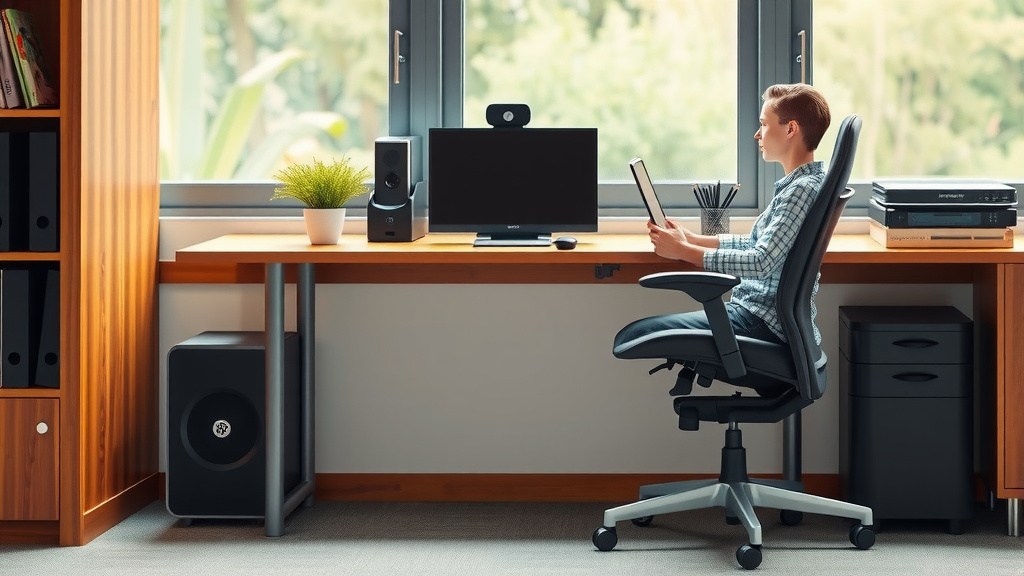
- Adjustable Seat Height: Feet flat, knees at 90 degrees.
- Adjustable Seat Depth: Space between knees and seat edge.
- Effective Lumbar Support: Supports your lower back’s natural curve.
- Adjustable Armrests: Shoulders relaxed, elbows at 90 degrees.
- Reclining Backrest: With adjustable tilt tension and locks.
- Breathable Material: Especially if you tend to get warm.
Conclusion
Finding a good ergonomic office chair is an investment in your daily comfort and long-term health. We’ve seen how chairs with adjustable height, depth, lumbar support, and armrests can drastically improve your posture and reduce strain. Prioritizing these features ensures your chair fits your unique body, not the other way around. Don’t settle for discomfort; your body will thank you for it. Your next step is to start looking for a chair that meets these essential ergonomic needs and ideally, try it out before you buy.
Frequently Asked Questions
How much should I expect to spend on a good ergonomic chair?
You can find a decent ergonomic chair for a few hundred dollars, but high-quality chairs with more advanced features can range from $500 to over $1,000. We’ve found that investing a bit more upfront often leads to better durability and comfort over time.
Can an ergonomic chair really help with back pain?
Yes, a well-adjusted ergonomic chair can significantly help reduce back pain by supporting your spine’s natural curve and encouraging proper posture. Many users report a noticeable decrease in discomfort after switching to an ergonomic model that fits them correctly.
Is a mesh chair better than a fabric or leather one?
Mesh chairs are excellent for breathability, keeping you cooler during long work sessions. Fabric and leather can also be comfortable and durable, but they might not offer the same airflow. We found that breathability is a key factor for comfort, especially in warmer environments.
What’s the most important ergonomic feature to look for?
While several features are important, adjustable lumbar support is often considered one of the most critical for maintaining good posture and preventing lower back pain. Ensuring your chair supports your lower back’s natural curve is key.
How do I know if my chair is set up correctly?
Your feet should be flat on the floor, your knees at about a 90-degree angle, and your armrests should allow your shoulders to relax with your elbows bent at roughly 90 degrees. There should also be a small gap between the seat edge and the back of your knees.